Wi‑Fi basics: notes from Mist training
Wi‑Fi Basics / Mist training
1. IEEE standards & Wi‑Fi Alliance
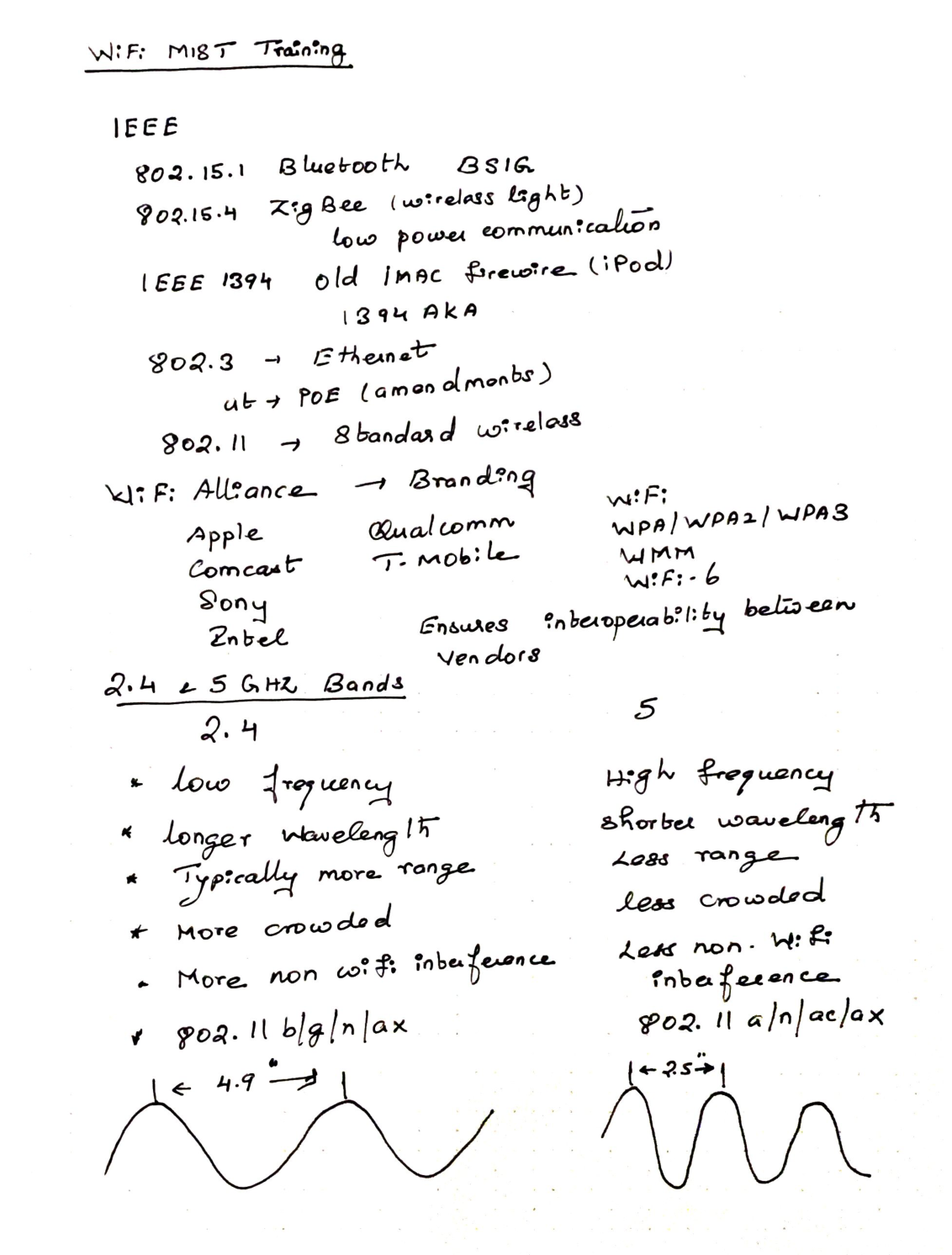
| Standard | Notes from class |
|---|---|
| IEEE 802.15.1 | Bluetooth (Bluetooth SIG) |
| IEEE 802.15.4 | Zigbee (wireless light), low‑power communication |
| IEEE 1394 | Old iMac FireWire / iPod era |
| IEEE 802.3 | Ethernet (PoE via amendments) |
| IEEE 802.11 | Standard wireless LAN |
Wi‑Fi Alliance
- Branding + ensures interoperability between vendors
- Example members noted: Apple, Comcast, Sony, Intel, Qualcomm, T‑Mobile
- Keywords: WPA / WPA2 / WPA3, WMM, Wi‑Fi 6
2. 2.4 GHz vs 5 GHz bands
| 2.4 GHz | 5 GHz | |
|---|---|---|
| Frequency | Low | High |
| Wavelength (class sketch) | Longer (~4.9”) | Shorter (~2.5”) |
| Range | Typically more | Less range |
| Crowding | More crowded | Less crowded |
| Non‑Wi‑Fi interference | More | Less |
| Amendments | 802.11 b / g / n / ax | 802.11 a / n / ac / ax |
- 2.4 / 5 GHz → unlicensed spectrum
- 802.11n → either 2.4 or 5
- 802.11ac → only 5 GHz
3. Major 802.11 amendments
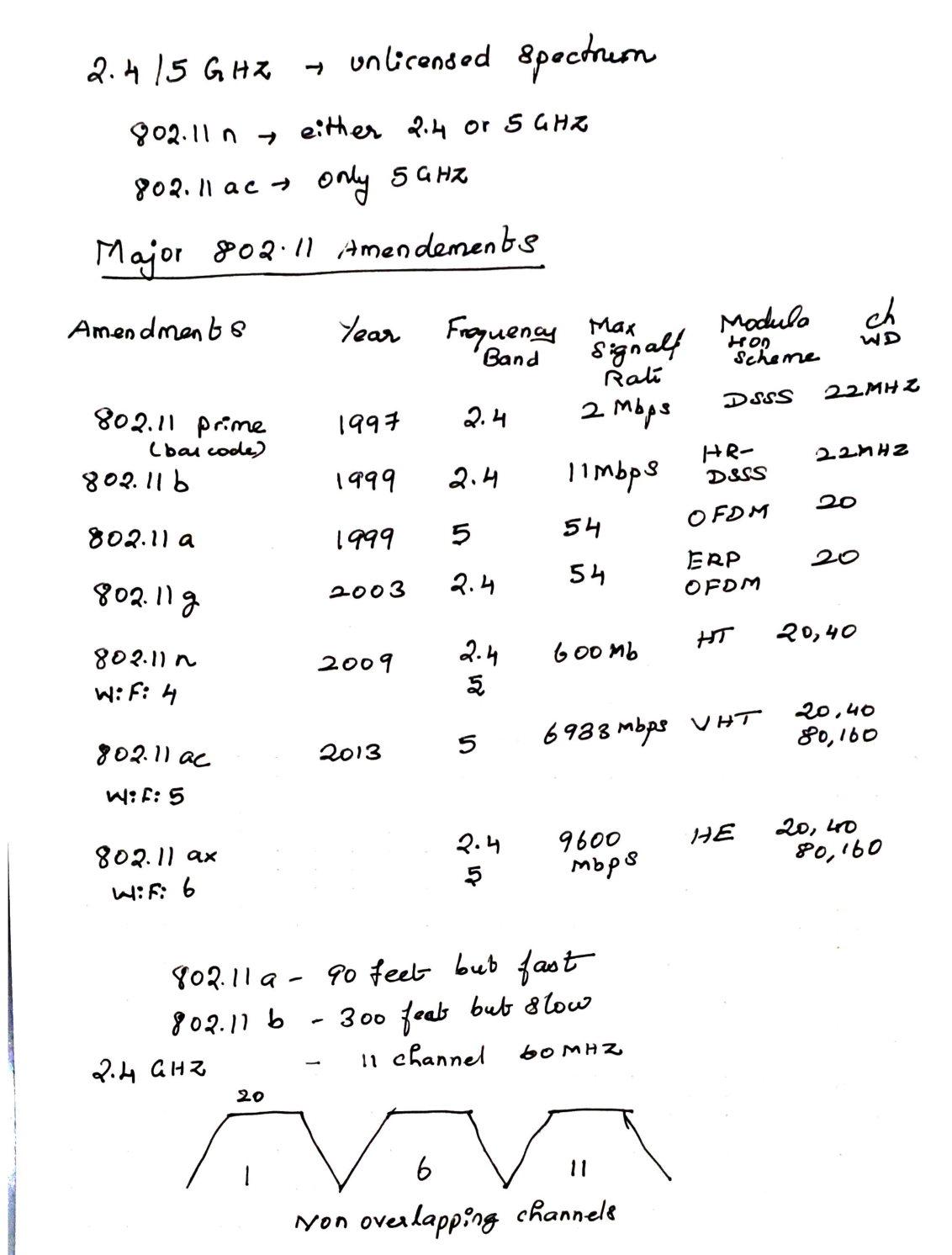
| Amendment | Year | Band | Max signal rate (as written) | Modulation / mode | Channel width |
|---|---|---|---|---|---|
| 802.11 (prime) | 1997 | 2.4 | 2 Mbps | DSSS | 22 MHz |
| 802.11b | 1999 | 2.4 | 11 Mbps | HR‑DSSS | 22 MHz |
| 802.11a | 1999 | 5 | 54 Mbps | OFDM | 20 MHz |
| 802.11g | 2003 | 2.4 | 54 Mbps | ERP‑OFDM | 20 MHz |
| 802.11n (Wi‑Fi 4) | 2009 | 2.4 & 5 | 600 Mbps | HT | 20, 40 |
| 802.11ac (Wi‑Fi 5) | 2013 | 5 | 6933 Mbps | VHT | 20, 40, 80, 160 |
| 802.11ax (Wi‑Fi 6) | — | 2.4 & 5 | 9600 Mbps | HE | 20, 40, 80, 160 |
Class comparison:
- 802.11a → ~90 feet but fast
- 802.11b → ~300 feet but slow
- 2.4 GHz note: 11 channels / ~60 MHz usable picture in many regions
- Non‑overlapping channels: 1, 6, 11
4. Co‑channel vs adjacent interference
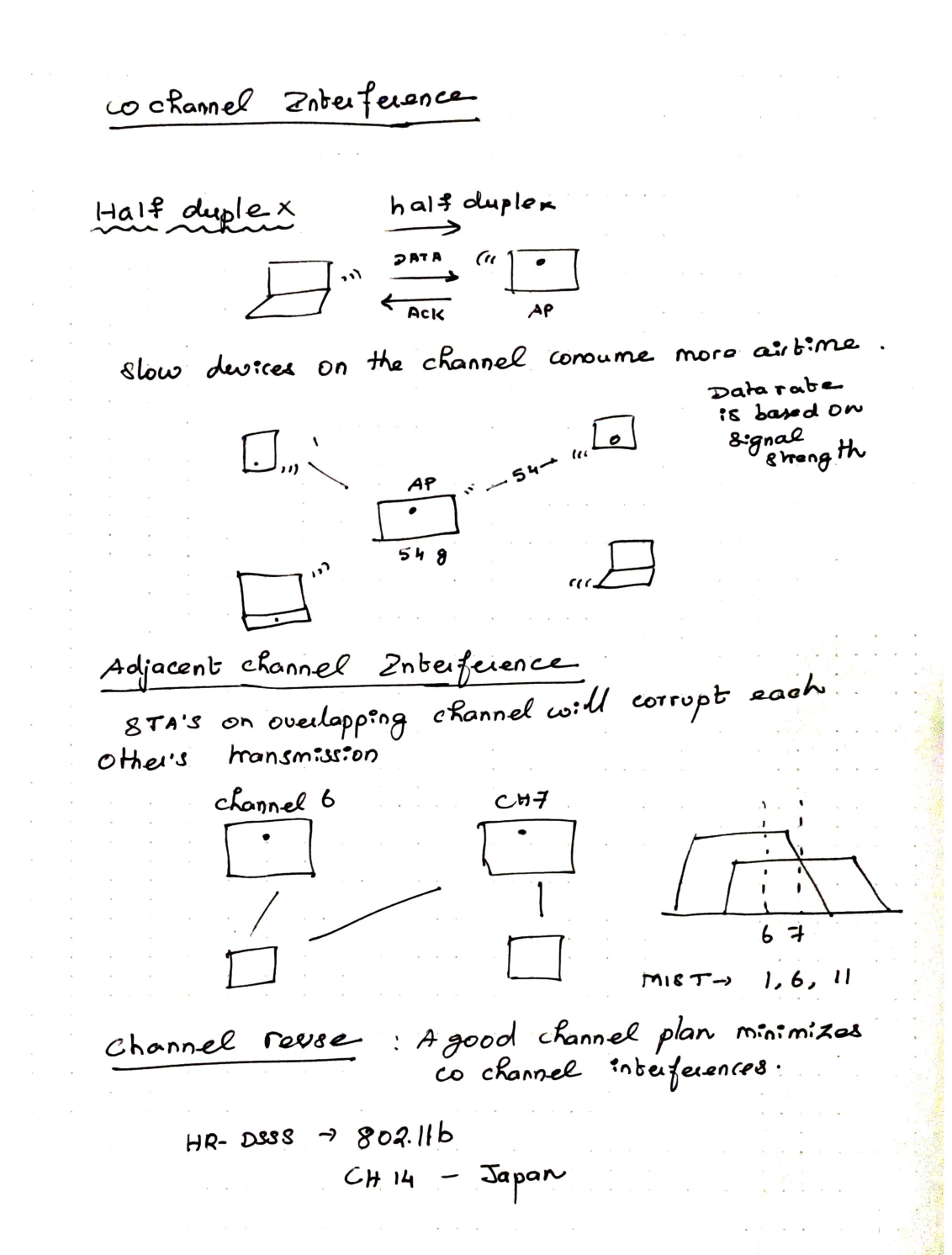
Co‑channel interference
- Wi‑Fi is half duplex (data then ACK; one useful talker at a time on the channel)
- Slow devices consume more airtime
- Data rate is based on signal strength (and SNR)
Adjacent channel interference
- STAs on overlapping channels corrupt each other’s transmissions
- Example conflict: channel 6 next to channel 7
- Mist guidance in notes: stick to 1, 6, 11
Channel reuse
- A good channel plan minimizes co‑channel interference
- HR‑DSSS → 802.11b
- CH 14 — Japan
5. 5 GHz channels, bonding, dB vs dBm
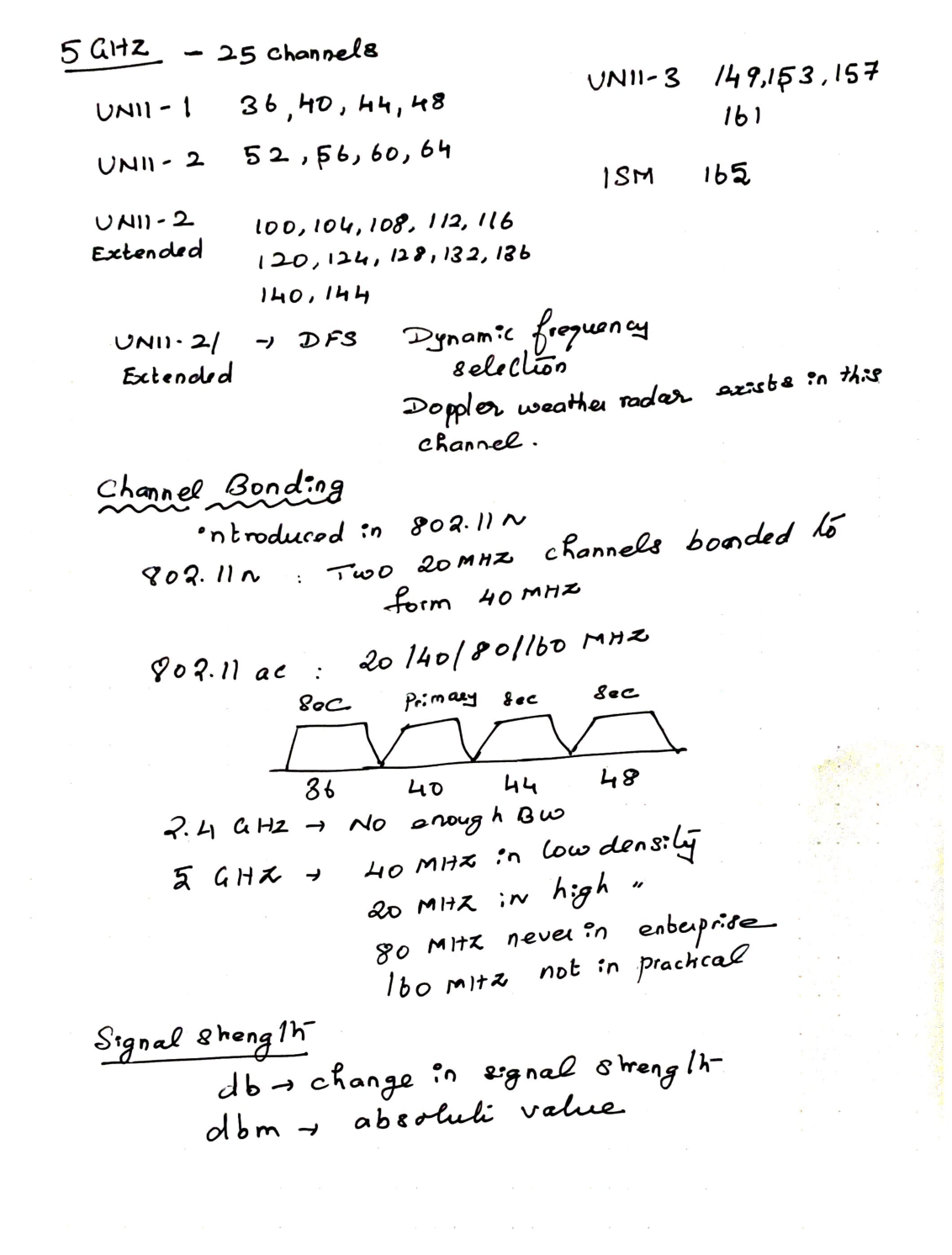
5 GHz (~25 channels in notes)
- UNII‑1: 36, 40, 44, 48
- UNII‑2: 52, 56, 60, 64
- UNII‑2 Extended: 100, 104, 108, 112, 116, 120, 124, 128, 132, 136, 140, 144
- UNII‑3: 149, 153, 157, 161
- ISM: 165
- UNII‑2 / Ext → DFS (Doppler weather radar exists in these channels)
Channel bonding
- Started prominently in 802.11n: two 20 MHz → 40 MHz
- 802.11ac: 20 / 40 / 80 / 160 MHz
- Bonding sketch for 36–48: Sec / Primary / Sec / Sec over channels 36, 40, 44, 48
Practical notes:
- 2.4 GHz → not enough BW for wide enterprise bonding
- 5 GHz → 40 MHz in low density; 20 MHz in high density
- 80 MHz → never default in enterprise (per notes)
- 160 MHz → not practical
Signal strength wording
- dB → change in signal strength
- dBm → absolute value
6. Rules of 3s & 10s, dBm targets, IDs, other wireless
Rules of 3s & 10s
- +3 dB → double the signal strength
- −3 dB → half the signal strength
- +10 dB → 10× more
- −10 dB → 10× less
dBm examples from notes
| dBm | Note |
|---|---|
| −60 dBm | 0.000001 mW |
| −70 dBm | 0.0000001 mW |
| −30 dBm | Good signal |
| −65 dBm | Voice app / mobile device |
| −67 dBm | Streaming video |
| −75 dBm | Web browsing, email, IM |
| −80 dBm | Generally reliable (as written) |
| −90 dBm | Drowning in the noise floor |
Network identifiers
- BSSID → MAC address of AP’s radio
- SSID → friendly name of Wi‑Fi network
- ESSID → multiple APs in the Wi‑Fi network (same SSID / ESS)
Other wireless technologies
- BLE → 2.4 GHz; location services; blue‑dot indoor navigation
- Zigbee → 2.4 GHz; low power / throughput; ~250 kbps; mesh
- CBRS → Citizens Broadband Radio Service; 3.5–3.7 GHz; widths 5 / 10 / 15 / 20 / 40 MHz
- dedicated and tiered licensing model
- upcoming / new technology (at time of notes)
- limited early handset support (Phone 11 / Pixel / Samsung called out)
6 GHz
- Wi‑Fi in new spectrum
- Potential for lots of new channels
- Upcoming / potential new technology (Wi‑Fi 6E era)
7. BLE vs Wi‑Fi channels, Ethernet vs wireless NIC
- BLE uses advertising channels 37, 38, 39
- Those sit between Wi‑Fi channels 1, 6, 11 in the class diagram
- Notes claim BLE is placed to avoid colliding with those Wi‑Fi centers
Ethernet
- CSMA/CD
- Only receives frames destined for it
- Consistent data rate / throughput ≈ line rate
Wireless NIC
- CSMA/CA — listen or send/receive
- Demodulates all 802.11 frames it hears
- Data rate varies with signal strength, SNR, traffic on the channel
8. Throughput, SNR, data rates, management frames
- Actual throughput is roughly half the data rate
- Throughput decreases as client count increases
How to make Ethernet / wireless faster
- Decrease interference (shielding, twist rate on copper side)
- Better signal strength / better SNR
SNR
- How much signal is above background noise
- Example sketch: RSSI ≈ −60 dBm, noise floor ≈ −95 dBm → SNR ≈ 35 dB
Data rates
- 802.11b → 1, 2, 5.5, 11 Mbps
- 802.11a/g → 6, 9, 12, 18, 24, 36, 48, 54
- 802.11n/ac → MCS index
- Charts: mcsindex.com, wlanpros.com MCS charts
Management frames (STA associating / disassociating)
- Beacon
- Probe request / Probe response
- Auth request / Auth response
- Association request / Association response
- Disassociation
9. Control/data frames, airtime arbitration, roaming, association
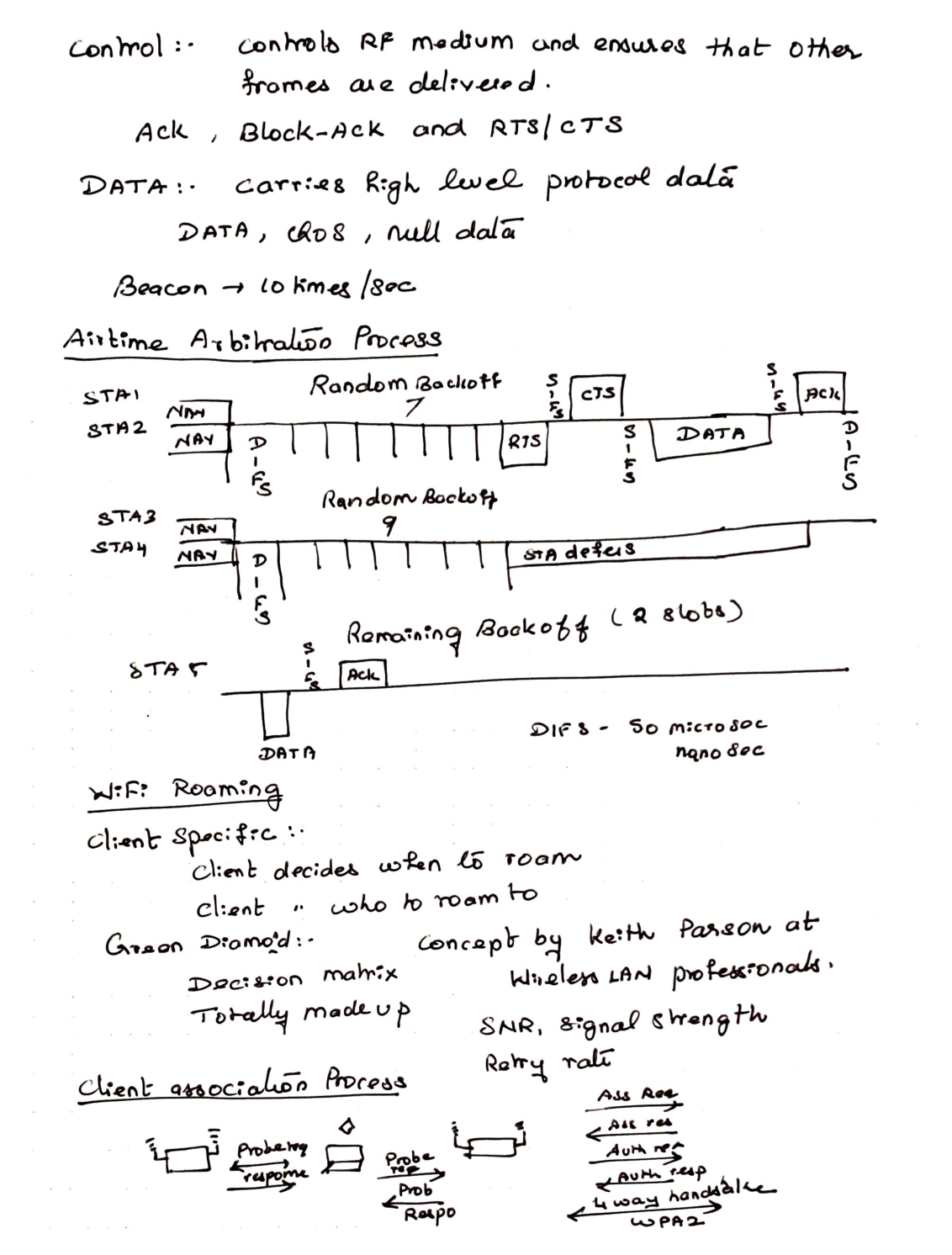
Control frames — control the RF medium / help delivery
- ACK, Block‑ACK, RTS/CTS
Data frames — high‑level protocol data
- DATA, QoS, Null data
Beacon → about 10 times / sec
Airtime arbitration (CSMA/CA sketch)
Timeline ideas from notes: NAV, DIFS (~50 µs in sketch), random backoff (examples 7 and 9), RTS → SIFS → CTS → DATA → ACK, remaining backoff slots, some STAs defer.
Wi‑Fi roaming
- Client decides when to roam
- Client decides who to roam to
- Green diamond (Keith Parsons / WLAN Pros): decision matrix using SNR, signal strength, retry rate — noted as a teaching model (“totally made up”)
Client association process (as sketched)
Probe Req / Probe Resp → then join path including Ass Req / Ass Resp, Auth Req / Auth Resp, and 4‑way handshake (WPA2).
(Standard open‑system order is usually Auth → Assoc → 4‑way; keep that in mind when reading captures.)
10. Wi‑Fi security & design questions
Security
- Open → no auth and no encryption
- WEP → hex key; broken
- WPA → stop‑gap; ~54 Mbps era
- WPA‑Personal / PSK → 8–63 character pre‑shared key
- WPA‑Enterprise → credentials via RADIUS
- WPA2 → new cipher suite; required new hardware
- WPA3
- Enhanced Open / OWE for open networks
- Personal → forward secrecy with SAE
- Enterprise → stronger encryption
Design
“If you aim at nothing, you’ll hit it every time.” — Zig Ziglar
Network requirements to capture:
- Where do you need Wi‑Fi?
- Where do you not need Wi‑Fi?
- What devices will you use?
- How many devices / users?
- What applications (web, voice, video, …)?
11. Design thresholds & carrier sense (Wi‑Fi Basic‑2)
- Not all clients support all channels
- APs on unsupported channels are invisible to that client
- Client capability reference: clients.mikealbano.com
Design requirements from notes
- Primary coverage min −67 dBm
- Secondary coverage min −75 dBm
- Minimum data rate 24 Mbps (raw rate, not throughput)
- SNR target 25 dB
- Channel overlap: max 1 AP above −85 dBm on a shared channel
Also noted: Ekahau for design work.
Review
- Wireless is half duplex
- Physical carrier sense detects whether the channel is busy
Energy detect
- Listen for any RF on the channel
- Question: “Do I hear RF on my channel?”
- Threshold ≈ −62 dBm
Clear Channel Assessment (Wi‑Fi detect)
- Question: “Do I hear any other Wi‑Fi device on the channel?”
- Threshold ≈ −82 dBm (backoff)
12. Virtual carrier sense, duty cycle, utilization
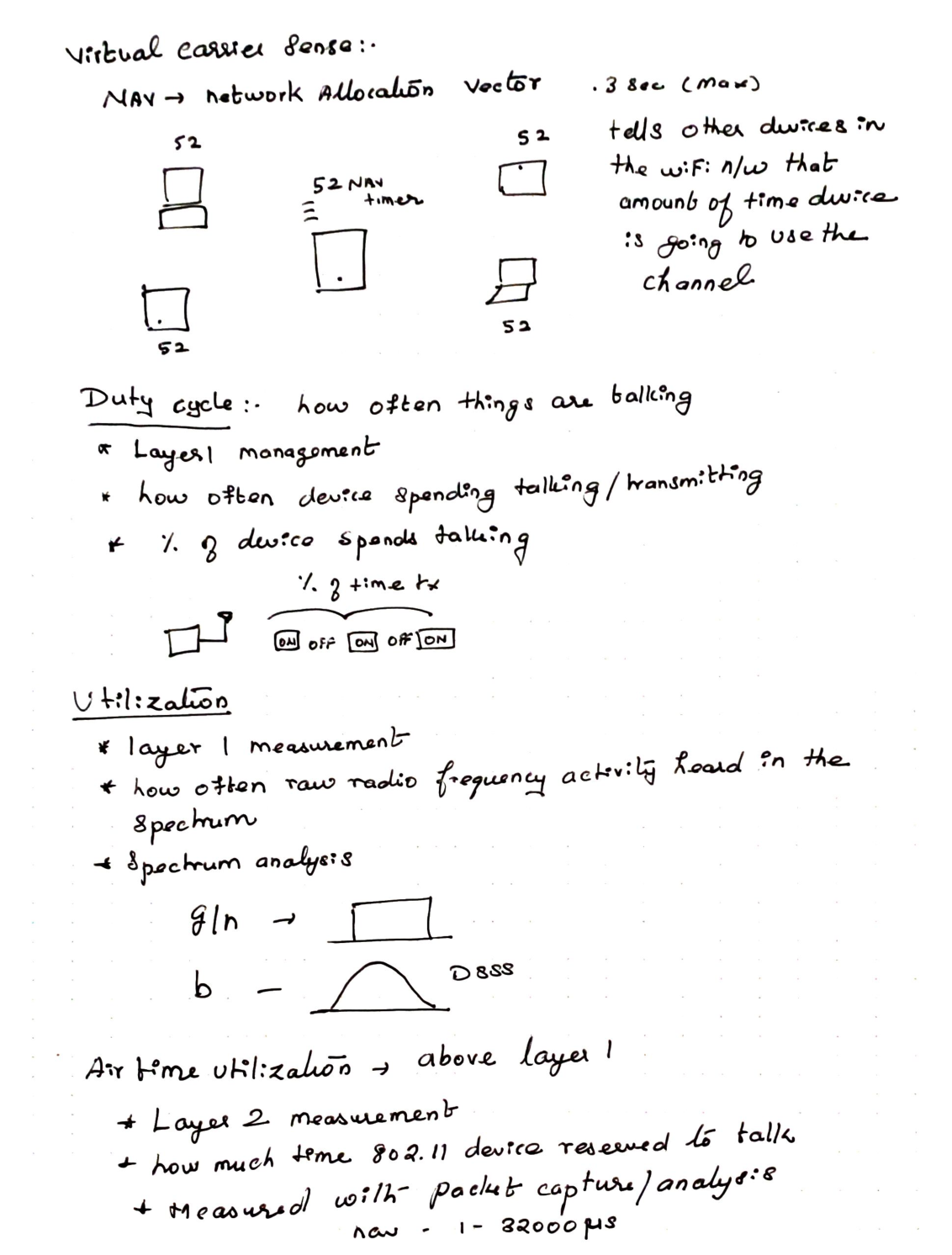
Virtual carrier sense
- NAV = Network Allocation Vector
- Tells other devices how long a device will use the channel
- Notes: up to ~0.3 sec max; also 1–32000 µs range noted
Duty cycle
- How often things are talking (L1)
- % of time transmitting (ON / OFF / ON …)
Utilization
- L1 measurement of raw RF activity in the spectrum
- Spectrum analysis view
- Sketch contrast: g/n rectangular‑ish pulses vs b / DSSS bell curve
Airtime utilization
- Above L1 → Layer 2 measurement
- How much time 802.11 devices reserved to talk
- Measured with packet capture / analysis
13. Things that consume airtime (Wi‑Fi Basic‑3)
- More devices (co‑channel interference)
- Poor coverage (device talks slower)
- Legacy data rates
- Too many virtual SSIDs
Multi‑Preshared Key
- Avoid multiple SSIDs when possible
- One SSID, different policies (printers, etc.)
Site survey note
- Identify rogue antennas / APs, etc.
SLE → Service Level Expectation (Mist)
Data rate influencers
- Spatial streams
- Modulation
- Channel width
- SGI (short guard interval) — spacing between symbols / transmits
14. Modulation: ASK / FSK / PSK / BPSK
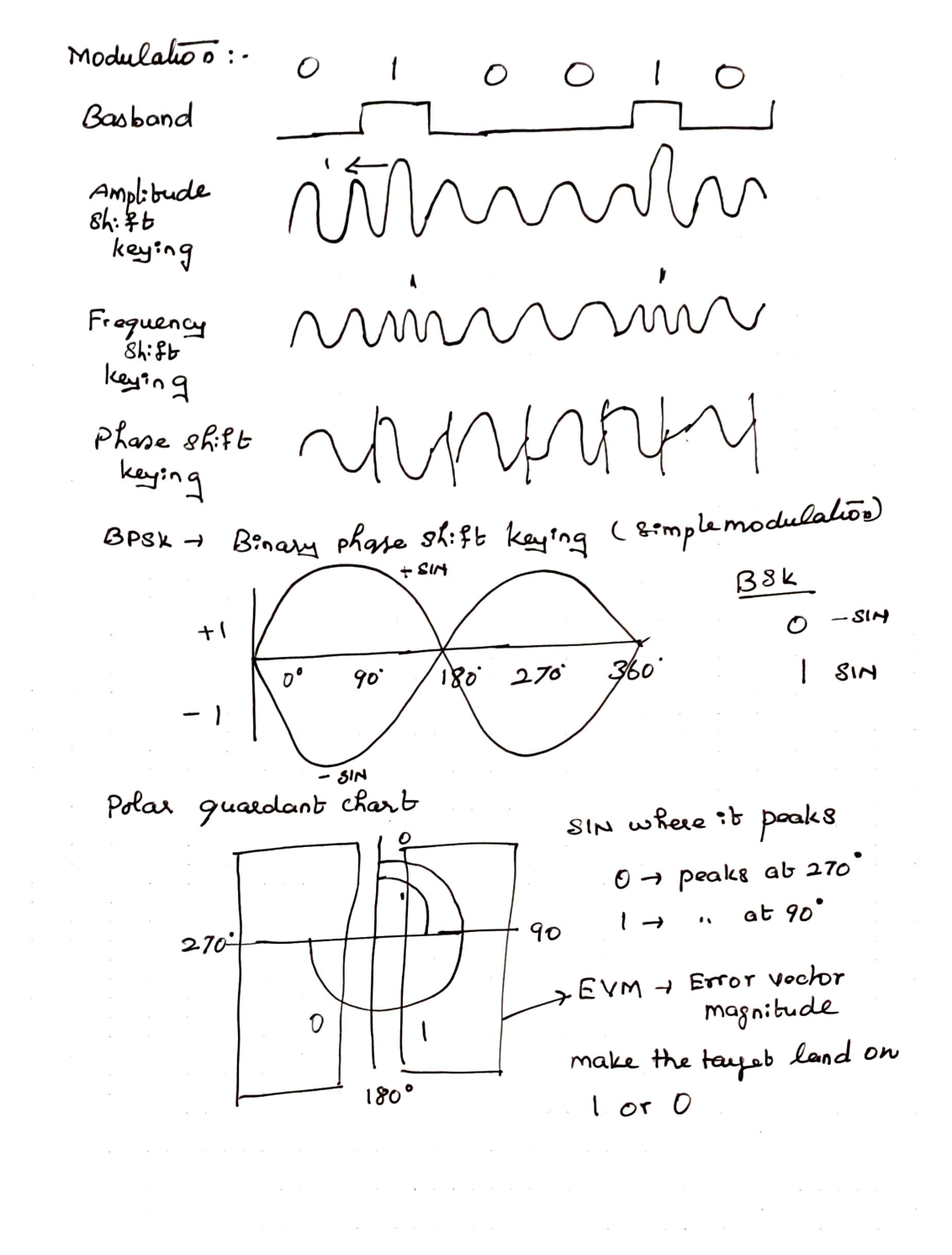
Bit sequence example: 0 1 0 0 1 0
- Baseband → square wave of bits
- ASK → amplitude changes with bits
- FSK → frequency changes with bits
- PSK → phase flips with bits
BPSK (binary phase shift keying) — simple modulation
0→ −SIN1→ +SIN- Peaks idea: 0 near 270°, 1 near 90°
- EVM (Error Vector Magnitude) → how far the symbol lands from the ideal 0/1 target
15. QPSK and 16‑QAM
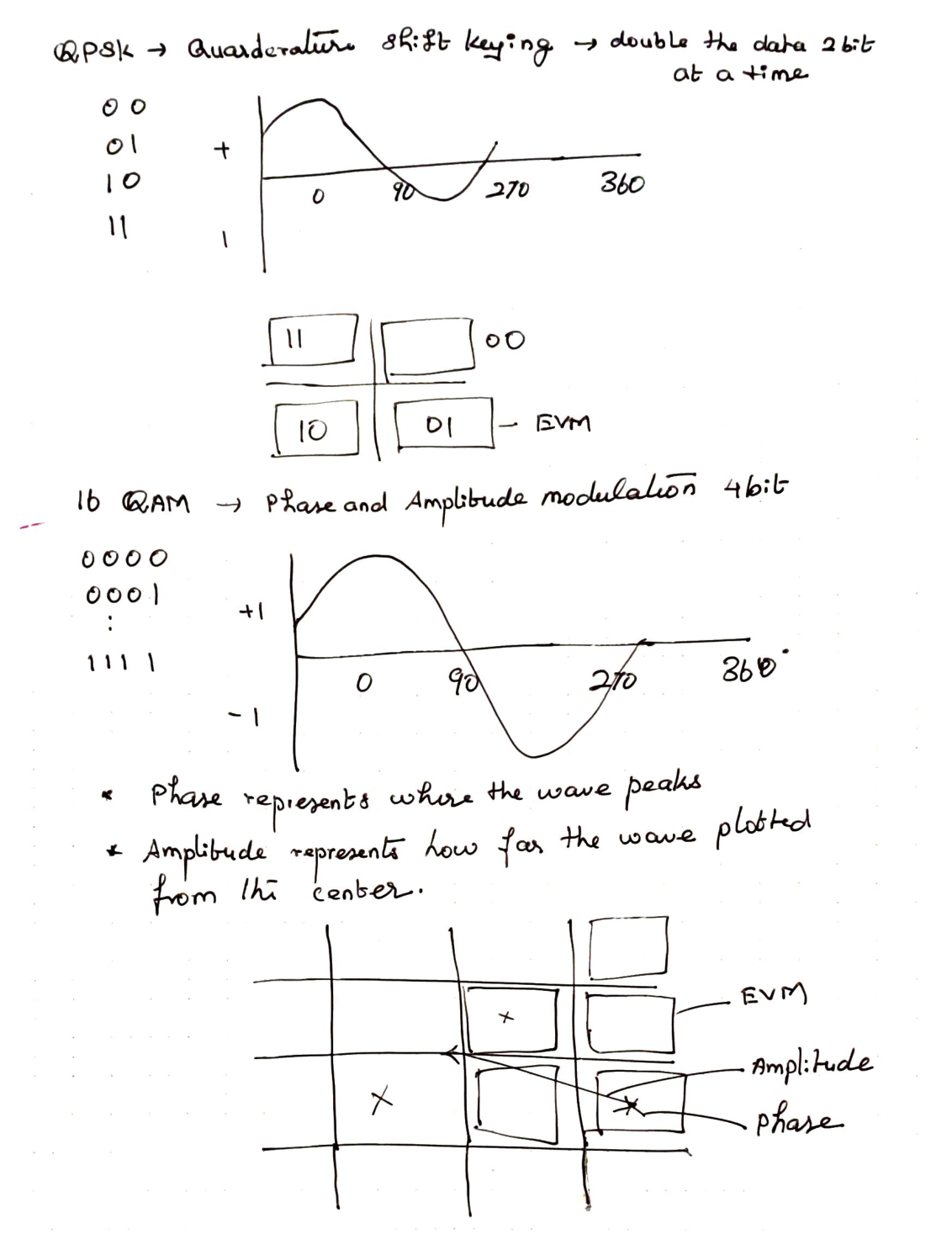
QPSK → quadrature phase shift keying → 2 bits at a time
Patterns: 00, 01, 10, 11 on a 4‑point constellation (EVM still matters)
16‑QAM → phase and amplitude → 4 bits
- Phase → where the wave peaks
- Amplitude → how far from center
- Constellation grid with EVM / amplitude / phase vectors
16. Higher QAM, retries, SNR vs rate
- 64‑QAM → 6 bits
- 256‑QAM → 8 bits/symbol (802.11ac)
- 1024‑QAM → 10 bits/symbol (802.11ax)
Relationships from notes:
- Very close to AP → excellent rate due to dense QAM
- SNR ↓ → rate‑shift to lower QAM
- Weaker signal → larger EVM box → less data rate
- Bad SNR → receiver stops getting usable ACKs
- Data rate behavior is tightly tied to retries
- Airtime goes up as SNR goes down
17. OFDM subcarriers & spatial streams
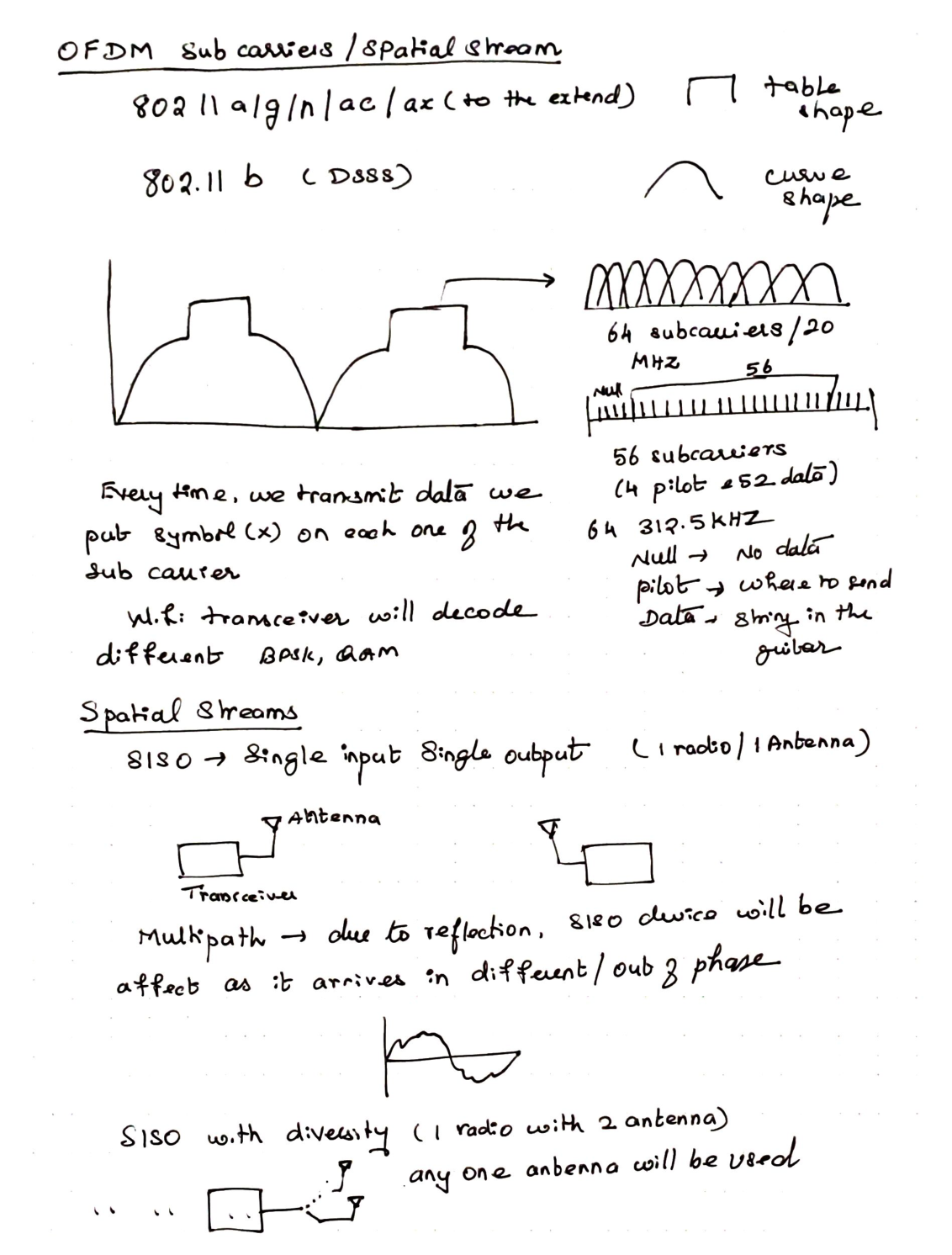
- 802.11 a/g/n/ac/ax → OFDM family (table / rectangular spectrum sketch)
- 802.11b → DSSS (curve / bell shape)
Teaching model for 20 MHz OFDM:
- 64 subcarriers / 20 MHz
- 56 used → 4 pilot + 52 data (plus nulls)
- Spacing note: 312.5 kHz
- Null → no data
- Pilot → reference (“where to send”)
- Data → “strings on the guitar”
Each transmit places a symbol on each used subcarrier; the transceiver decodes BPSK / QAM variants.
SISO → 1 radio / 1 antenna
- Multipath (reflections, out of phase) hurts SISO
SISO with diversity → 1 radio / 2 antennas
- Any one antenna used (switch / select)
18. MIMO & antenna patterns
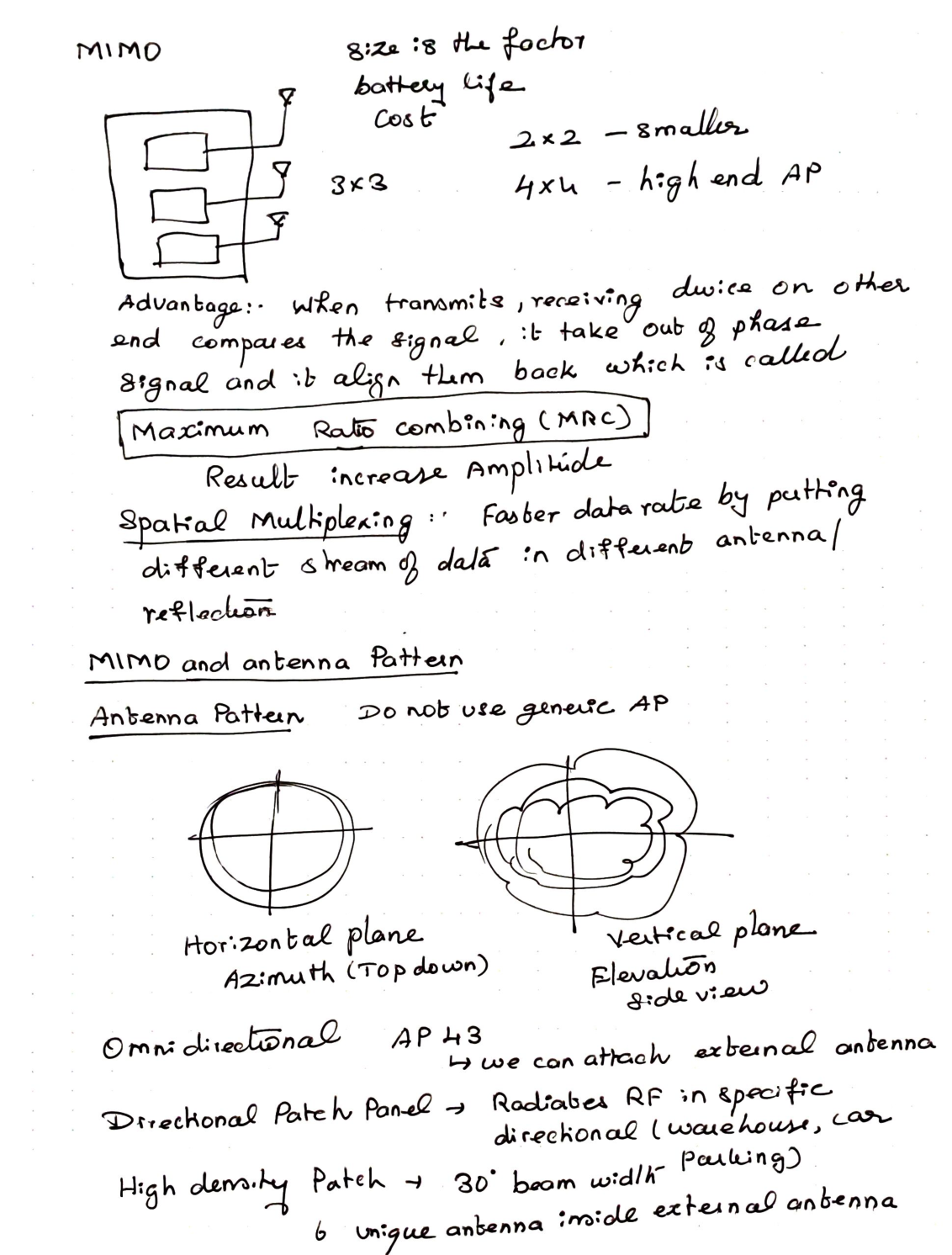
MIMO
- Size / battery / cost tradeoffs
- 2×2 smaller clients
- 3×3
- 4×4 high‑end APs
- MRC (Maximum Ratio Combining): receiver aligns out‑of‑phase copies → increases amplitude
- Spatial multiplexing: different data streams on different antennas / paths → faster rate
Antenna pattern
- Do not blindly use a generic AP pattern assumption
- Azimuth = horizontal / top‑down
- Elevation = side view
Antenna types
- Omnidirectional (e.g. AP43 with external options)
- Directional patch → warehouse / car parking
- High‑density patch → ~30° beam width; notes mention multiple unique antennas in the external assembly
19. AP43E & AP architectures
Reference also noted: badfi.com
AP43E (from notes)
- 2.4 GHz 4×4
- 5 GHz 4×4
- Scanning radio 2×2 (RRM scanning)
- 6 dual‑band connectors
Architectures
-
Autonomous
- No central management
- No AP coordination
- Traffic sent directly to DS
-
Lightweight AP
- Centrally managed
- APs coordinated
- Tunnels traffic to controller
- Controller puts traffic on DS
-
Cloud managed (Mist)
- Cloud managed / coordinated
- Traffic usually sent directly to DS
- Optional path via Mist Edge
Mist Edge
- Functions like a controller for tunnel use cases
- Tunnel all traffic to Mist Edge like a traditional controller
- L2TP endpoint note / port 1701 in notes
20. Mist templates, security classes, RRM
Mist positioning
- Microservices that scale automatically with AI (different from classic controller vendors)
Templates
- Config template → e.g. high‑density min data rate 18 Mbps, WLAN SSIDs
- RF template → 2.4 / 5 GHz power
- Flow: RF template → site configuration → config template
Network security classes
- Rogue AP → connected to some physical / wired network
- Honeypot → may not be on your LAN; advertises same SSID as Mist
- Neighbor AP
- Approved AP
Mist RRM
- Network → Radio Management
- AP density idea in notes: how many APs can hear each other (0.7–0.8) with low coverage gap
Global RRM (AI driven)
- Uses large dataset over days
- Uses reinforcement learning
- Runs daily ~3 am local / site (Scheduled RRM)
- Can be manually triggered per band (Triggered RRM)
- Global RRM is like a site RF “reset” button
Local RRM
- Runs ad‑hoc
- Reacts to local device events
- Cloud independent
- Event types from notes:
- Auto channel selection
- Auto triggered ACS
- Interference AP co‑channel
- Interference non‑Wi‑Fi
- Interference co‑channel external
- Neighbor AP down / recover
- Radar detected
- Post‑radar